
A replenishment email flow reminds a customer to reorder a consumable product shortly before they are likely to run out. It is the most mechanical of the automated flows a DTC brand runs, and the one where being approximately right is worth the least.
Ask ten brands when their replenishment email goes out and most will say thirty days. Ask why thirty, and the answer is usually that it was in the template. Send it too early and you are asking someone to buy a thing they still have plenty of. Send it late and they have already run out, felt the gap, and quite possibly bought from somebody else. There is a right window, it is knowable, and it is in your order history.
- Your reorder cycle is in your data. Measure it; do not assume thirty days.
- Use the median gap between orders, not the average. A few very late reorders distort the average.
- Calculate it per product and per size. A 60-serving tub and a 30-serving tub are two cycles.
- Send before the run-out: cycle minus delivery time minus a few days of thinking room.
- If customers reorder on a tight schedule every time, offer a subscription instead of emailing them.
How to work out your real reorder cycle
Take every customer who has ordered the same product at least twice. Measure the days between their first and second order of it. Then take the median of those numbers, not the average.
The median matters more than it sounds. Reorder data is badly skewed. A handful of people come back after eleven months and drag an average upward until it describes nobody. The median tells you when the typical customer actually returns.
A worked example. Say 300 customers have bought your 60-serving protein tub twice. Sort their gaps between first and second order from shortest to longest. The middle value, the 150th, is 41 days. That is the cycle. The average of the same data might be 58 days because of a long tail of occasional buyers, and a flow timed at 58 days would arrive two and a half weeks after most customers had already run out.
You can do this three ways:
- A spreadsheet. Export orders from Shopify with customer, product and date, keep each customer’s first two orders of the product, subtract the dates and take the median.
- A retention analytics app that reports time between orders per product.
- Klaviyo’s predictive analytics, which estimate an expected date of next order for each customer. Klaviyo’s documentation sets the bar for these predictions: at least 500 customers who have placed an order, at least 180 days of order history with orders in the last 30 days, and at least some customers with three or more orders.
Do it again every few months. A cycle is not a constant. It moves when pack sizes, pricing or your customer mix change.
Why the cycle differs per product
This is where a single global timer falls apart. A 60-serving tub does not run out at the same time as a 30-serving one. A refill lasts differently from the starter kit that contains it. Someone buying the large size is often a heavier user, so the bigger pack may last barely longer at all.
Two products, two cycles, two timers. If your catalogue has more than a handful of consumables, the flow needs to read what was bought and branch, rather than counting the same number of days for everyone. It is more work to build once, and it is the difference between a flow that feels well-timed and one that feels random.
Send before the run-out, not after
The cycle tells you when they finish the product. That is not when to send.
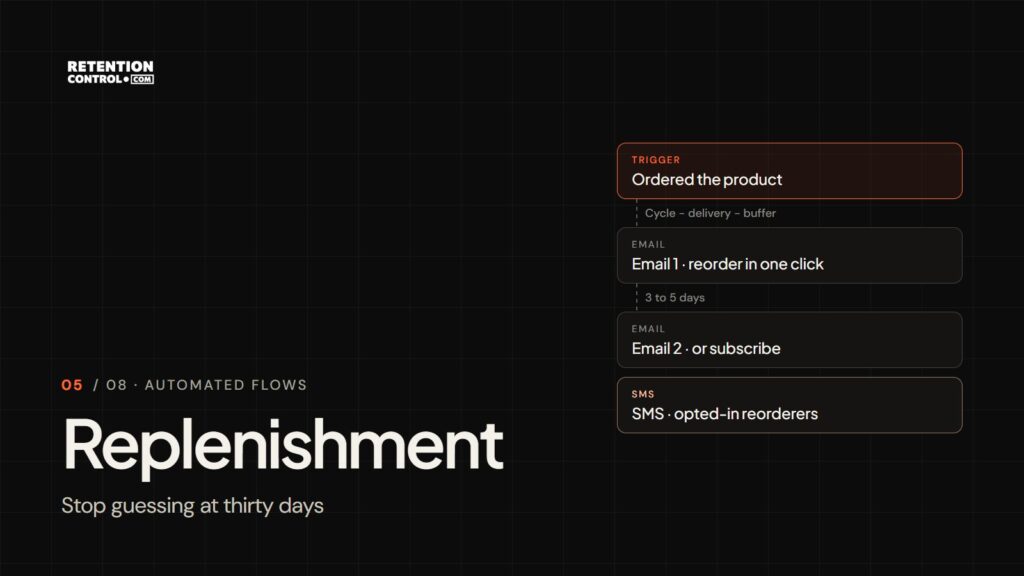
Work backwards: send day = reorder cycle − delivery time − a few days of thinking room. With a 41-day cycle, four days of delivery and three days of buffer, the first email goes on day 34. It arrives while the customer still has some left, because the message you want is a convenient reminder, not a rescue.
Once they have actually run out, one of three things has already happened. They bought elsewhere, they substituted, or they discovered they were fine without it. None of those are recovered by an email that shows up afterwards. Running out is the churn moment, and the entire point of this flow is to arrive before it.
The sequence
| When | What it does | |
|---|---|---|
| 1 | Cycle − delivery − buffer | A plain reminder with a one-click reorder link and the product they bought |
| 2 | 3 to 5 days later, if no reorder | A second nudge, plus the subscription option if you offer one |
| SMS (optional) | Same day as email 2 | Only for customers who opted in to texts and reorder reliably |
Keep the reminder short and practical. Show the exact product and size they bought, not the bestseller, and make reordering one click.
When a subscription is the better answer
If a product has a tight, predictable cycle and customers reorder it repeatedly, a replenishment email is a slightly worse version of a subscription. You are manually re-selling something the customer has already decided they want on a schedule.
Replenishment earns its place where usage genuinely varies, where customers want to stay in control of timing, or where the catalogue is broad enough that people rotate between products rather than repeating one. Those cases are common. But if you find yourself sending the same reminder to the same person every six weeks and they buy every time, offer them the subscription and stop making them click. Our DTC retention work covers subscription programmes for exactly this reason.
Five replenishment mistakes
One timer for the whole catalogue. The template’s 30 days is right for almost nothing. Each product family needs its own delay.
Sending after the run-out. An email that arrives once the customer has already switched brands is not a reminder; it is a receipt for the order you lost.
Recommending something else. The replenishment email has one job: make reordering the same thing effortless. Cross-selling belongs in post-purchase.
Emailing subscribers. Anyone on a subscription for that product already has it coming. Reminding them to buy it again invites confusion and cancellations.
Ignoring pack size. Customers who buy the large size are often heavier users, so the larger pack lasts less time than its size suggests. Measure it rather than scaling the smaller pack’s cycle.
How to build it in Klaviyo
- Trigger: the Ordered Product metric, which records each product in an order, with a trigger filter for the product or product group.
- One branch per cycle: either a flow per product family, or trigger splits on product name leading to different time delays.
- Time delay: the send day you calculated, not a template default.
- Flow filter: Ordered Product zero times since starting this flow, filtered to the same product, so anyone who has already reordered exits.
- Subscriber exclusion: if your subscription app syncs to Klaviyo, exclude profiles with an active subscription for that product.
- Holdout: a random-sample split that sends nothing to 10% of entrants, so you can measure what the flow actually adds.
How to judge it
The honest test is the holdout. Compare the reorder rate within the cycle plus two weeks for people who got the emails against the 10% who did not. The difference is what the flow is worth. Revenue attributed to the flow on its own will always overstate it, because many of those customers would have reordered anyway.
Where to go next
Replenishment follows the post-purchase flow, which handles the first weeks after an order. When a customer misses their cycle altogether, the job passes to the win-back flow.
Working out cycles per product across a real catalogue is a data job before it is an email job. If you would rather not do it in a spreadsheet, book a free 60-minute audit and we will do it with you.