
A browse abandonment flow emails a known subscriber who viewed a product but left without adding anything to their cart. Of all the automated flows a DTC brand runs, it has by far the largest audience, because most visitors browse and leave. Only a small fraction ever reach a cart.
That size is the problem. Somewhere in your account there is probably a browse flow that treats a product view exactly like an abandoned cart, with the same urgency and often the same words. A cart is a decision. A product view is a glance. Treat a glance like a decision and you will annoy a great many people to convert a few.
- Trigger on product pages only, for identified subscribers who did not add to cart.
- Wait hours, not minutes. An email twenty minutes after a glance reads as surveillance.
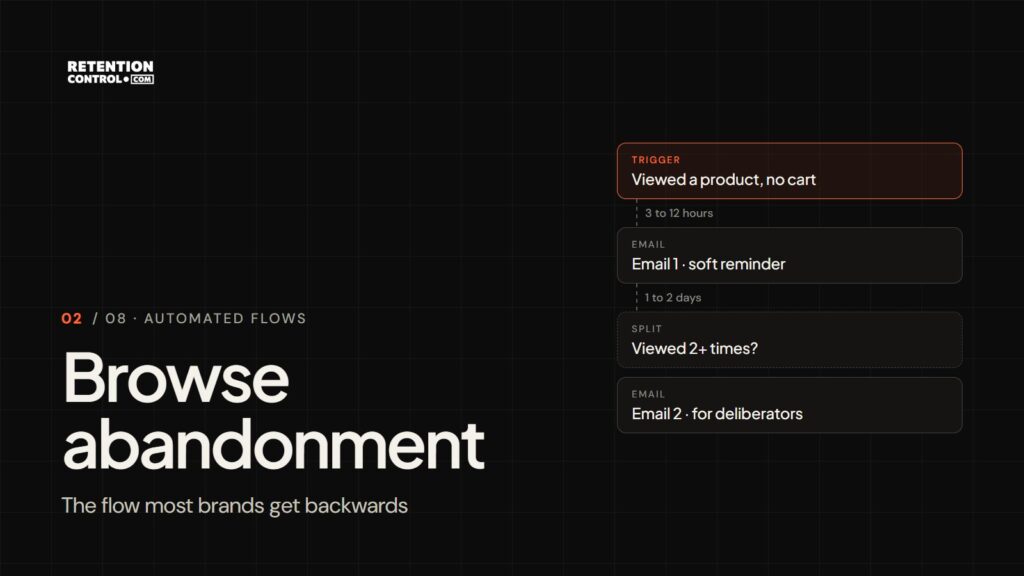
- One view earns a soft email; repeat views earn a real one. Let the threshold change the message.
- No discount in the first email. Intent is too weak to justify the margin.
- The suppressions are the flow. Owners, active carts, out-of-stock items and anyone emailed today are excluded.
Browse abandonment vs cart abandonment
The two flows share a shape and almost nothing else. Building one as a copy of the other is the most common mistake in this category.
| Browse abandonment | Cart abandonment | |
|---|---|---|
| Signal | Viewed a product | Added to cart or started checkout |
| Intent | Weak: looking, comparing, curious | Strong: decided, then stopped |
| Audience | Very large | Small |
| First email | Hours later, often next morning | Within the hour |
| Tone | Helpful reminder | Service message: here is your basket |
| Discount | Rarely, and never first | Only as a last resort |
| Unsubscribe risk | High, because the signal is weak | Lower |
Everything below follows from the first two rows.
What actually counts as a browse trigger
The default setup on most platforms fires on any tracked page view by an identified subscriber. That is too loose, and it is why so many browse flows produce embarrassing sends. A usable trigger is narrower:
- Product pages only. Category pages, blog posts, the shipping policy and the contact page are not shopping signals. Someone reading your returns policy is very often a person who has already bought.
- Identified visitors only. You need an email address, which in practice means subscribers and past customers, not the anonymous majority.
- No add-to-cart in the session. The moment they add to cart, they belong to the cart flow. Two flows firing on one session is the most common overlap error there is.
- Not your own team. Staff, agencies and freelancers browse the site constantly. If they are on your list, they trip the flow every day. Exclude your company’s email domain.
Why three views is not the same signal as one
A single product view is frequently noise: a mis-click, a link from a newsletter, a bounce, a search landing on the wrong item. Firing an email at that is how the flow earns its reputation for being creepy.
Repeat views are different. Someone who has come back to the same product three times over two days is doing something recognisable: deliberating. Several views of different products in one category is the same signal wearing a different hat: comparing.
So set a threshold and let it change the message.
- One view: a soft, low-pressure email that mostly restates what the product is for and links back to it.
- Two or more views in 48 hours: an email that addresses deliberation directly: sizing, materials, the comparison against the obvious alternative, the returns policy stated plainly.
The version of this flow that works is the one that sounds like it noticed, not the one that sounds like it followed.
Timing: the creepiness budget
Cart abandonment works in minutes because the intent is hot and the context is obvious. Everyone understands that a shop knows what is in their basket.
Browse is not obvious. Most people do not think of a product page as something recorded against their name, so an email twenty minutes after a glance reads as surveillance rather than service. The delay is a social setting, not a technical one.
A few hours is the floor. The next morning often does better than the same day, because the email arrives as a fresh thought rather than a reaction. Wait too long and the interest has cooled, but the cost of being early is not just a weaker send. It is the unsubscribe, which removes that person from every other flow you run.
| When | For whom | Content | |
|---|---|---|---|
| 1 | 3 to 12 hours after the last view | Everyone who qualifies | The product they viewed, what it is for, one link back |
| 2 | 1 to 2 days later | Repeat viewers who have not bought | Sizing, comparison, reviews, returns: the answers deliberators need |
Two emails is enough for most catalogues. A third belongs only to high-consideration products where the buying cycle genuinely runs for days.
What the emails should actually say
The copy has one constraint the cart flow does not: you cannot assume they want the product. They looked. That is all you know. So the first email should sound like a helpful shop assistant, not a salesperson who followed them to the car park.
Email 1, the single-view reminder. Lead with the product, not with the fact that you noticed. A dynamic block with the image, name and price does the reminding for you; the copy’s job is to say what the product is for and who it suits. Subject lines that work here describe the product rather than the behaviour:
- “The linen shirt, in all four colours”
- “What makes the 60-day serum different”
- “Still deciding? Here is the short version”
Avoid “We saw you looking” and anything with “forgot”. They are the lines most likely to produce the unsubscribe.
Email 2, the deliberation email. This one goes only to repeat viewers, so it can assume more interest and answer harder questions: how it fits, what it is made of, how it compares with the obvious alternative, what happens if it is wrong. Reviews that mention the specific worry work better than a star rating. Subject lines can be more direct: “How the Everyday and the Travel compare” or “Free returns, and how they work”.
For category browsers, people who viewed several products in one category, show the category rather than a single item. Their question is which one, not whether.
When not to send at all
The suppression rules decide whether this flow earns money or quietly erodes your list.
- They already own it. Emailing someone about the thing sitting in their bathroom cabinet is the fastest way to look like you do not know who they are.
- They are in the cart flow. Cart wins, every time. Suppress browse for the duration.
- The product is out of stock. Send a back-in-stock message instead, or nothing.
- They have already had an email today. Set a frequency cap across all flows, not per flow. Flows do not know about each other unless you make them.
- It was a one-time purchase category. Nobody needs a nudge about the mattress they bought last month.
How to build it in Klaviyo
- Trigger: the Viewed Product metric. It requires Klaviyo’s onsite tracking to be active on your Shopify store, which the Shopify integration handles.
- Flow filters: Added to Cart zero times since starting this flow, Started Checkout zero times since starting this flow, Placed Order zero times since starting this flow, and has not been in this flow in the last 7 days, so a heavy browser is not emailed on every visit.
- Staff exclusion: a profile filter where the email address does not contain your company domain.
- Time delay: start at 4 hours and test next morning against it.
- Conditional split: Viewed Product at least 2 times in the last 2 days. The yes branch gets the deliberation email as email 2; the no branch stops after email 1.
- Dynamic product block: show the product from the triggering event, so the email names exactly what they looked at.
Omnisend’s equivalent is its Browse Abandonment automation, with exit conditions on cart and order events. Klaviyo’s own setup guide covers the template; the filters above are what turn the template into something you would want to receive.
How to judge it
Judge browse abandonment on revenue per recipient and on its unsubscribe rate against your account average. If the unsubscribe rate on the first email is well above your average, the trigger is too loose or the delay is too short. Fix those before touching the copy. Its share of total flow revenue will always be smaller than cart abandonment’s, and that is fine: the audience is colder.
Where to go next
Browse abandonment sits between the welcome flow, which catches people at signup, and cart abandonment, which takes over the moment a product reaches the basket.
If you want this built against your own catalogue and suppression rules rather than assembled from a template, that is the work we do as a retention marketing agency. Book a free 60-minute audit of what you have running now, or see how we approach email retention marketing.